

So you want to sell something online. Maybe you have a product you've been making at home, a clothing brand you've been dreaming about, or a small business you'd like to take digital. Whatever your reason, building an ecommerce website has never been more accessible — even if you have never written a line of code in your life. With the right approach to ecommerce website development services, you can launch a professional online store much faster than you might expect.
This guide is written for people who are new to ecommerce web development. We won't drown you in technical jargon. Instead, we'll walk you through the key things you need to understand to get an online store up and running in 2026 — and the decisions you'll need to make along the way. By the end, you'll have a clear picture of what's involved, what it costs, and exactly where to start.
An ecommerce website is simply a website where people can browse your products and buy them online. Think of it as your shop — but instead of being on the high street, it's on the internet, open 24 hours a day, reachable by anyone in the world. Unlike a physical store, it never closes, never needs staff on the shop floor, and can serve customers whether you're asleep or on holiday.
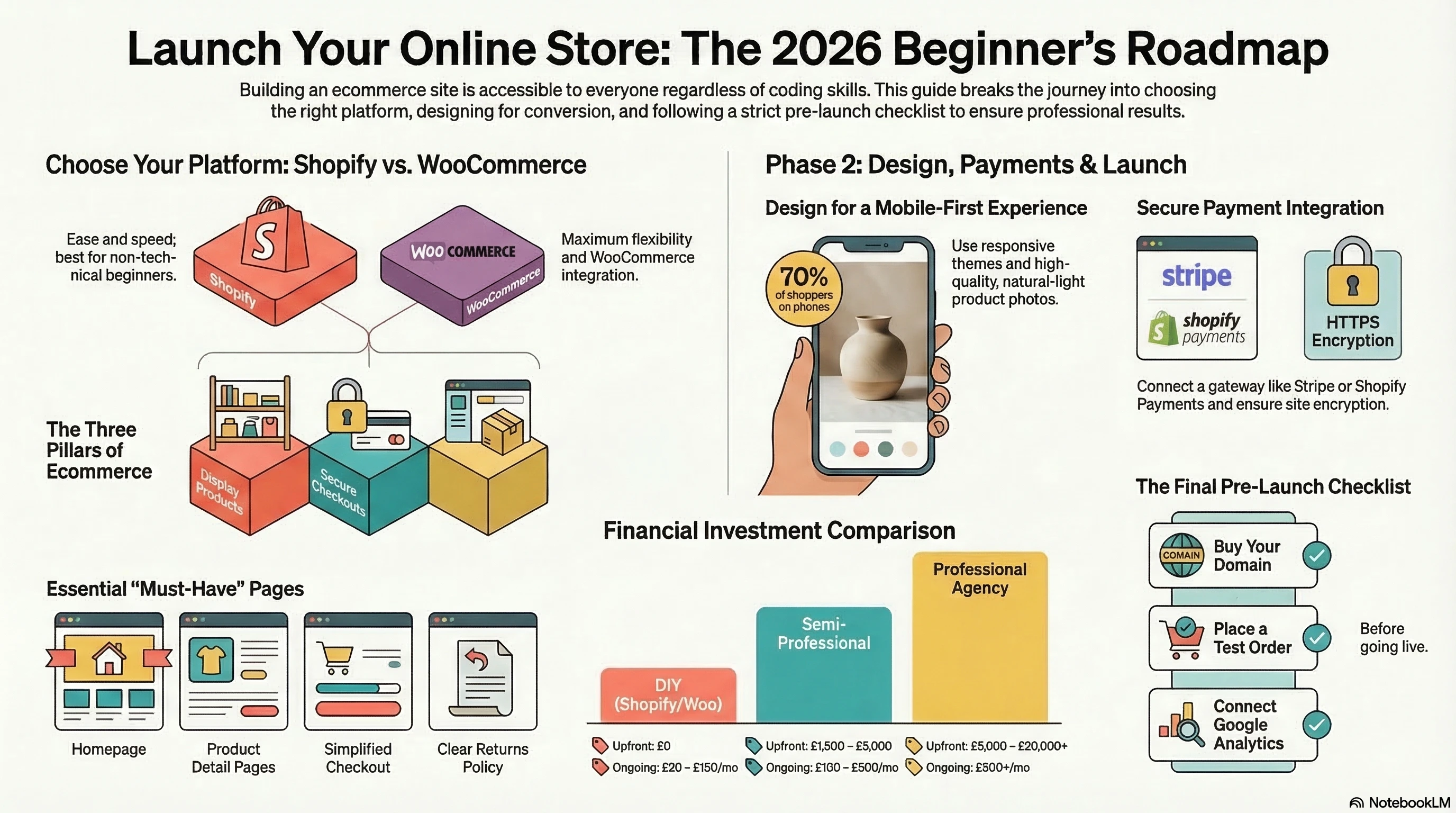
At its core, every ecommerce website does three things:
- Shows your products — with photos, descriptions, prices, and sizes or variants.
- Handles the purchase — a shopping cart where customers add items, then a checkout where they pay.
- Manages orders — a behind-the-scenes area where you can see who bought what and arrange delivery.
Everything else — the design, the features, the integrations — is built on top of those three foundations. Whether you're selling handmade candles or a full clothing range, the underlying structure is the same. The platform you choose simply determines how much of it is set up for you automatically.
If you've never built a website before, the whole thing can feel like a mystery. Here's a simple breakdown of what's happening behind the scenes when someone visits your store and makes a purchase:
Step 1 – A customer visits your website
They type your web address (domain name) into their browser, or find you through Google. Your website
loads — this is your storefront, hosted on a server somewhere in the world. The server is essentially
a powerful computer that stores all your website files and delivers them to visitors instantly.
Step 2 – They browse and choose a product
They scroll through your product listings, click on something they like, and view the product
detail page with photos, a description, and a price. Good product pages make it easy to understand
exactly what they're buying and give them the confidence to proceed.
Step 3 – They add it to their cart
Just like picking something off a shelf. The item goes into a virtual shopping basket, and they
can continue browsing or head straight to checkout.
Step 4 – They check out and pay
They enter their delivery address and pay by card, PayPal, Apple Pay, or whatever methods you offer.
The payment is processed securely — the money goes to your account, typically within 1–3 business days.
Step 5 – You receive the order
You get an email notification, pack up the item, and send it out. The customer gets a confirmation
email and tracking updates. The whole process — from their first click to your notification — can
happen in under two minutes.
That's it. The platform you choose handles most of this automatically — your job is to set it up correctly, keep it stocked, and make sure the experience is smooth enough that customers want to come back.
The platform is the software your store runs on. It's one of the most important decisions you'll make early on — because it shapes how easy your store is to build, manage, and grow. The good news is that for most beginners, the choice comes down to just two or three clear options.
Shopify — Best for Beginners
Shopify web development is one of the most popular approaches for building an ecommerce store, and for good reason. You don't need to know how to code. You don't need to worry about hosting, security, or updates — Shopify handles all of that for you. You just sign up, pick a design, add your products, and start selling. It also comes with a built-in app store where you can add extra features like loyalty programmes, reviews, or email marketing as your business grows.
- Very easy to set up — most people launch within a week
- Looks professional out of the box
- Works well on mobile from day one
- Monthly fee (starts around £25/month)
- Small transaction fee if you use a payment provider other than Shopify Payments

WooCommerce — Best If You're Already on WordPress
WooCommerce is a free plugin that turns a WordPress website into a shop. It's a great option if you already have a WordPress blog or business site and want to add a store. There's no monthly platform fee, but you will need to pay for hosting and handle some technical setup yourself (or hire someone to do it). Because it's open-source, there are thousands of free and paid plugins available to extend your store in almost any direction.
- No platform licence fee
- Very flexible — you can customise almost anything
- Requires a bit more technical know-how than Shopify
- Good choice if you want to keep costs low long term

BigCommerce — A Solid Middle Ground
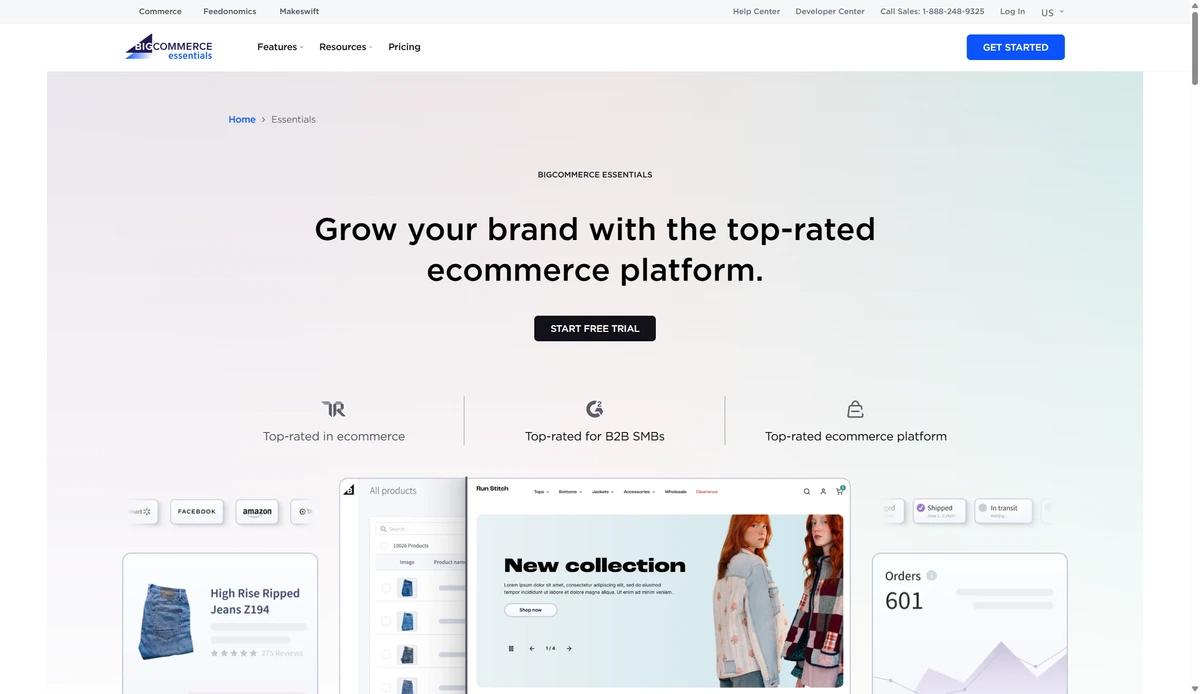
BigCommerce is similar to Shopify but with no transaction fees on any plan. It's a good option for stores that plan to sell across multiple channels (like your own website plus Amazon or TikTok Shop) from early on. It also has strong built-in features that reduce the need for paid third-party apps, which can help keep ongoing costs manageable as you scale.
Which Should You Choose?
If you're just getting started and want the simplest experience: go with Shopify. If you're on a tight budget and are comfortable with WordPress: WooCommerce is worth the extra setup effort. If you anticipate selling across multiple channels quickly, BigCommerce is worth a look. You can always switch platforms later — it's not a permanent decision, and many businesses migrate successfully as they grow.
When you build your store, there are a handful of essential pages every ecommerce site should have. These aren't optional — customers and search engines expect to find them. Missing any of these can make your store look unfinished and erode the trust you need to convert first-time visitors into buyers.
Homepage
Your first impression. It should be clear, attractive, and tell visitors instantly what you sell.
Include your best products or a current promotion, and make it obvious how to start shopping.
Think of it as the window display of your store — it should make people want to come inside.
Product Listing Pages
These are the category pages — "Women's Dresses", "Coffee Beans", "Phone Cases". They display
multiple products in a grid so customers can browse and filter by things like price or colour.
Good filtering options save customers time and help them find what they're looking for without
frustration.
Product Detail Pages
The individual page for each product. This is where buying decisions are made. Good product pages
have clear photos, an honest description, the price, any variants (size, colour), and a visible
"Add to Cart" button. Including customer reviews here also makes a significant difference to
how many visitors go on to buy.
Shopping Cart & Checkout
Where customers review what they're buying and pay. Keep this as simple as possible — the more
steps and form fields, the more people give up and leave. Offering guest checkout (so people don't
have to create an account) is one of the easiest ways to reduce drop-off at this stage.
About Us
People want to know who they're buying from. A short, honest story about you and your business
builds trust enormously, especially for smaller brands competing against larger retailers. A genuine
"About" page can be a real differentiator when customers are choosing between you and a competitor.
Contact Page
An email address, contact form, or live chat. Customers need to know they can reach you if
something goes wrong. Stores without visible contact information feel risky to buy from.
Delivery & Returns Policy
Be clear about how long delivery takes, how much it costs, and how returns work. Vague policies
are one of the biggest reasons customers abandon purchases. The more specific and reassuring you
can be here, the better.
You don't need to be a designer to have a store that looks professional. All major ecommerce platforms come with pre-built themes (templates) that you can customise with your own colours, fonts, logo, and photos. A good theme does most of the heavy lifting — your job is to apply your brand consistently and make sure the experience feels cohesive from homepage to checkout.
A Few Design Principles for Beginners
Use good product photos
This is the single most impactful thing you can do for your store. If your photos are blurry,
dark, or taken on a cluttered background, people won't buy — no matter how good your product is.
Natural light, a clean background, and a decent smartphone camera go a long way. If your budget
allows, even one session with a professional product photographer can transform how your store
looks and feels.
Keep it simple
You don't need flashy animations or ten different fonts. Clean, spacious, and easy to navigate
always outperforms busy and cluttered. Stick to two fonts maximum — one for headings, one for body
text — and keep your colour palette tight. If in doubt, do less.
Make it easy on mobile
Over 70% of online shoppers browse on their phones. Most modern themes are automatically
"responsive" — meaning they adapt to fit any screen size. But always test your store on your own
phone before launching, and check that buttons are easy to tap, images load quickly, and the
checkout works smoothly on a small screen.
Put your most important button in the right place
Your "Add to Cart" and "Buy Now" buttons should be impossible to miss. They should be a clear,
contrasting colour — not buried below the page fold or hidden in small text. Every product page
should make it completely effortless to take the next step toward purchase.
This is the part that worries a lot of first-time store owners — and it really shouldn't. Taking payments online is straightforward in 2026, and the platforms handle most of the hard work. You don't need a specialist technical background to get this set up correctly.
What is a Payment Gateway?
A payment gateway is the service that securely processes your customer's card details and transfers the money to your bank account. You never actually see or store anyone's card number — that's all handled by the gateway behind the scenes. It works a bit like a digital card reader in a physical shop: the customer taps or enters their details, and the money moves automatically.
The Most Common Options
- Shopify Payments — Built into Shopify. The easiest option if you're on Shopify. No extra monthly fees and supports Apple Pay and Google Pay automatically.
- Stripe — Clean, reliable, and widely trusted. Great for WooCommerce and custom-built stores. Charges a small percentage per transaction (around 1.5% + 20p in the UK).
- PayPal — Most customers already have a PayPal account, so offering this reduces friction. Worth adding as an extra option even if it's not your primary gateway. Many customers actively look for the PayPal option as a trusted familiar choice.
- Klarna / Clearpay (Buy Now, Pay Later) — Lets customers spread payments over several weeks. This is increasingly expected, especially for fashion, electronics, and home goods. It often increases average order values and removes the price barrier for higher-ticket items.
As a beginner, just start with Shopify Payments or Stripe. You can always add more payment options later once you're up and running and have a better sense of what your customers prefer.
One important thing: make sure your store uses HTTPS (look for the padlock icon in the browser bar). This encrypts customer data and is required for any store that takes payments. Most platforms enable this automatically, so in most cases you won't need to do anything — but it's always worth checking before you go live.
Once you've set up your products, chosen your design, and connected your payment method, it's time to go live. It's normal to feel like things aren't quite ready — but a live store you can learn from is always better than a perfect store sitting in draft. Here's a quick checklist of things to do before you hit publish:
- Buy a domain name — Your web address (e.g. www.yourbrand.co.uk). You can buy one through Shopify, or from a separate registrar like GoDaddy or Namecheap. Choose something short, memorable, and easy to spell.
- Write your policies — Delivery, returns, and privacy policy. Most platforms have templates you can fill in. Customers read these before buying, so the clearer and more reassuring they are, the better.
- Test the checkout — Place a test order yourself using a test payment method. Make sure the confirmation email arrives, looks right, and contains all the order details a customer would expect to see.
- Check your store on mobile — Open it on your phone. Does it look good? Are the buttons easy to tap? Does the checkout work without any confusion or zooming in?
- Set up a business email — A professional email address ([email protected]) looks far more credible than a Gmail address and builds confidence with first-time buyers.
- Connect Google Analytics — A free tool that tells you how many people are visiting your store, where they came from, and what they're clicking on. Set this up from day one so you have real data to learn from, rather than guessing what's working.
Don't wait for everything to be perfect. A live store you can improve is infinitely better than a perfect store that never launches.
The honest answer is: it depends entirely on how you approach it. The range is genuinely wide — from almost nothing to tens of thousands of pounds — but for most beginners the reality sits comfortably in the middle. Here's a realistic overview:
DIY (Do It Yourself) — £30 to £150/month
If you build it yourself using a platform like Shopify with a free or low-cost theme, your main ongoing costs are the platform subscription (£25–£65/month for Shopify) plus your domain name (around £10–£15/year). This is entirely achievable for a basic store, and many small businesses run successfully at this tier for years.
Semi-Professional — £1,500 to £5,000 upfront
Hiring a freelancer or small agency to set up and customise your store gives you a much more polished result without the weeks of self-learning. For this budget, you can expect a properly designed store with your branding, optimised product pages, and the key integrations set up correctly from day one. This is often the sweet spot for small businesses that want a professional result without enterprise-level investment.
Professional Custom Build — £5,000 to £20,000+
For stores with large catalogues, complex requirements (like subscriptions, B2B account management, or multi-currency selling), a professional agency build is worth the investment. You get something built specifically for your business, rather than adapted from a template, with full control over every feature and functionality.
Don't Forget Ongoing Costs
Beyond the initial build, budget for: platform subscription, any app or plugin subscriptions (email marketing, reviews, shipping tools), and potentially a small retainer for ongoing updates and improvements. These ongoing costs are typically £100–£500/month for a small to medium store. It's worth factoring these in from the start so there are no surprises once you're live.
This is one of the most common questions from people starting out — and there's no universal right answer. The best choice depends on your budget, your time, and how important it is that your store looks and performs professionally from day one. Here's a simple way to think about it:
Build it yourself if:
- You're on a very tight budget
- You have the time to learn (Shopify has excellent free tutorials and a helpful community)
- You're testing an idea before committing to bigger investment
- Your product range is small and straightforward
Hire a developer or agency if:
- Your time is better spent on other parts of your business
- You want a professional result from day one
- You have specific technical requirements (custom features, integrations, etc.)
- You've tried building it yourself and hit a wall
- You're investing significantly in driving traffic and want the store to convert well from launch
If you decide to hire, look for someone with a portfolio of live ecommerce stores they've built — not just general web design work. Ask to see real stores you can click through, and ask about their experience with your specific platform (Shopify, WooCommerce, etc.). A good development partner will ask questions about your business before recommending a solution, not the other way around.
Our team at Qaushik Labs specialises in ecommerce web development for small and growing businesses. Explore our web development services in Scotland or get in touch for a no-obligation conversation about your project.
Building an ecommerce website in 2026 is genuinely accessible to almost anyone. The platforms available today — particularly Shopify — have removed almost all of the technical barriers that used to make online selling feel out of reach for non-developers. What matters most now is not the technology itself, but the decisions you make around it: your platform choice, your product presentation, your checkout experience, and your willingness to keep improving after launch. For local business support, Qaushik also offers web design in Edinburgh for service and ecommerce websites.
The key things to remember: choose a platform that fits your comfort level and budget, invest in good product photos and clear descriptions, keep your checkout as simple as possible, and don't wait for perfection before you go live. Real customers, real orders, and real feedback will teach you more than any amount of planning — and every small improvement you make compounds over time. These principles apply across many industries, including businesses investing in healthcare advertising in Aberdeen, construction advertising in Aberdeen, home services advertising in Aberdeen, and travel advertising in Aberdeen.
Whether you're launching an ecommerce store or expanding an established business, continuous optimisation and learning are essential for long-term success. Companies seeking digital marketing services in Glasgow can benefit from the same mindset of testing, refining, and improving based on real-world customer behaviour and measurable results.
If you'd like expert help building or improving your online store, our team is here to make it straightforward. Visit our web development services in Edinburgh or get in touch to talk through your requirements.
Ready to Transform Your Digital Presence?
Let Qaushik Labs help you implement growth-focused solutions for your business. From websites and SEO to ads and automation, we’re here to help you generate better leads and revenue.
Get Started TodayNo. Platforms like Shopify are designed for people with no coding experience. You can have a fully functional store live within a week using their built-in tools, drag-and-drop editor, and pre-built themes. If you need custom features down the line, that's when hiring a developer becomes useful — but for getting started, no coding knowledge is required at all.
The cheapest route is a Shopify Basic plan (around £25/month) with a free theme and your own domain name (around £12/year). Alternatively, WooCommerce has no platform fee — you just pay for hosting, which can be as little as £5–£10/month on a basic plan. Keep in mind that very cheap hosting can affect your store's speed and reliability, so it's worth spending slightly more for a reputable provider.
A basic store built yourself on Shopify can be ready in a few days to a week. A professionally designed and built store typically takes 4–8 weeks depending on how many products you have, what custom features you need, and how quickly you can provide content like product photos and descriptions.
You'll need a payment gateway — a service that securely processes card payments. Shopify Payments and Stripe are the most beginner-friendly options. They handle all the security compliance and send the money straight to your bank account, minus a small transaction fee. Most platforms make it straightforward to connect a payment gateway without any technical expertise required.
Shopify is the most recommended platform for beginners and small businesses. It's easy to use, handles hosting and security for you, and scales well as your business grows. WooCommerce is a strong alternative if you're already using WordPress or want to keep long-term costs low. Both platforms are capable of supporting successful stores at any size when set up correctly.
If you build it yourself using Shopify, ongoing costs are roughly £30–£80/month. If you hire a freelancer or agency, expect to pay £1,500–£5,000 for a properly designed starter store, or £5,000–£20,000 for a larger custom build. There are also ongoing costs for apps, email marketing tools, and platform subscriptions — typically £100–£500/month for a small to medium store.
Technically you can receive payments into a personal account when starting out, but a business bank account is strongly recommended. It keeps your finances separate, looks more professional to payment processors, simplifies your tax reporting, and makes it much easier to manage cash flow as your order volume grows.