

Building a professional jewelry website today is easier than ever thanks to platforms like WordPress and WooCommerce, along with modern solutions like Shopify web development. Whether you are an independent jewelry designer, a small jewelry brand, or a traditional jewelry store expanding online, these tools allow you to create a fully functional ecommerce store capable of selling products worldwide.
However, launching a successful jewelry website involves more than installing a theme and uploading products. A well-built jewelry ecommerce store requires the right domain and hosting, a properly configured WooCommerce setup, and a jewelry-focused website design supported by professional jewelry website development in Delhi, jewelry web development services in Gurgaon, and jewelry website development in Noida. Additionally, essential plugins for security and performance, along with a structured system for managing product variations like ring sizes, metal types, and gemstones, are critical for long-term success.
In this guide, you will learn the complete process of building a jewelry website—from setting up WordPress and WooCommerce to choosing the right themes, installing essential plugins, configuring payments with services like Stripe and PayPal, managing product variations, and optimizing your website for search engines.
We also explore professionally designed WooCommerce jewelry templates such as the Jewelry Store WooCommerce Theme, the Luxury Jewelry Store WordPress Theme, and the Jewellery Niche Market WooCommerce Template, which are designed to showcase jewelry collections with elegant layouts and strong product presentation.
By the end of this guide, you will understand how to build a secure, scalable, and SEO-optimized jewelry ecommerce website using WordPress and WooCommerce, along with the tools and costs involved in launching and growing your online jewelry store.
Before building a jewelry website using WordPress and WooCommerce, it is helpful to understand a few basic terms. These concepts will make the setup process much easier to follow, especially if you are creating a website for the first time.
Domain Name
A domain name is the address of your website on the internet, such as yourbrand.com. Customers use this address to visit your online jewelry store. It acts like the digital identity of your business.
Web Hosting
Web hosting is the service that stores all the files of your website and makes them accessible on the internet. When someone visits your domain name, the hosting server delivers your website pages, images, and products to the visitor’s browser.
WordPress
WordPress is a content management system (CMS) used to create and manage websites. It allows you to build pages, publish blog posts, install themes, and manage website content without needing advanced coding skills.
WooCommerce
WooCommerce is a WordPress plugin that converts a regular website into an online store. It adds ecommerce features such as product listings, shopping cart functionality, checkout pages, payment gateways, and order management.
WordPress Theme
A theme controls the design and layout of your website. It determines how your pages look, including colors, typography, menus, and product display. Jewelry websites often use elegant themes that highlight product images.
WordPress Plugins
Plugins are small software extensions that add new features to your website. They can improve SEO, enhance security, optimize performance, compress images, and add advanced ecommerce functionality.
Shop, Cart, and Checkout Pages
WooCommerce automatically creates these pages when it is installed. The Shop page displays products, the Cart page shows selected items, and the Checkout page allows customers to enter their details and complete payment.
Before building the website, it is important to understand why jewelry websites are slightly different from regular ecommerce stores.
Jewelry products often have multiple variations. A single ring might have several combinations such as different gold purities, different sizes, or different gemstone qualities. For example, a diamond ring may be available in 14K gold, 18K gold, and 22K gold, and each of those may have different diamond grades.
Because of this complexity, jewelry websites must support:
- product variations
- detailed product specifications
- high-resolution images
- secure payment processing
- flexible inventory management
WooCommerce supports all of these requirements, which is why many jewelry businesses use it as their ecommerce platform.
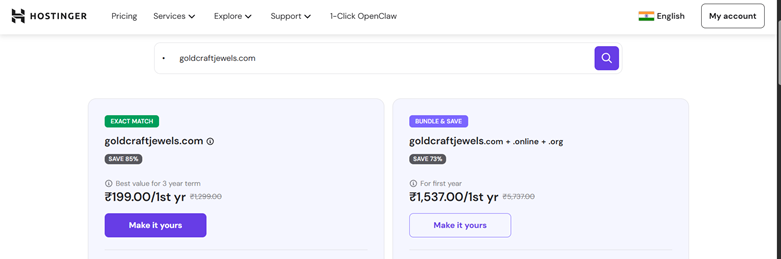
The first step in creating any website is purchasing a domain name, which is the address customers will type into their browser to visit your website.
Examples of domain names for jewelry stores include:
- royaldiamonds.com
- goldcraftjewels.com
- luxuryringstore.com
A good domain name should be short, easy to remember, and closely related to your brand identity so that customers can easily recognize and recall it.
Domain names can be purchased from trusted domain registrars such as GoDaddy domain registration service, Namecheap domain provider, or through hosting companies like Hostinger domain registration, which often allow you to purchase a domain and hosting together when setting up a new website.
Before purchasing a domain, it is a good idea to check whether the domain name you want is available and choose an extension such as .com, .net, or .store, depending on your branding strategy.
After purchasing a domain name, you need a hosting provider. Hosting is the server where your website files are stored, allowing visitors to access your website online.
For a jewelry ecommerce website, you should choose a hosting provider that offers:
- fast server speeds
- automatic backups
- security protection
- free SSL certificate
- WordPress optimization
Popular hosting providers include:
- SiteGround
- Bluehost
- Hostinger
- Cloudways
Once you have purchased hosting, the next step is installing WordPress. Most hosting providers offer a one-click WordPress installation, which makes the process extremely simple even for beginners.
Inside your hosting control panel (often called cPanel), you will usually find an option labeled WordPress Installer or Softaculous Apps Installer. These tools allow you to install WordPress automatically without manually uploading files or configuring databases.
When you click the installer, you will be asked to enter basic information such as your website name, admin username, and password. After submitting these details, the installer automatically sets up WordPress on your hosting server.
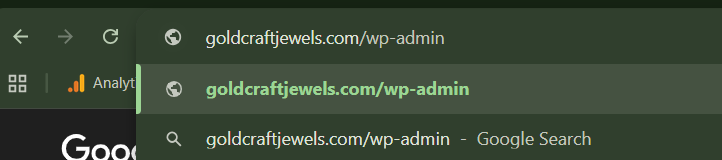
After installation is complete, you can log into your website dashboard by visiting:
yourdomain.com/wp-admin
This dashboard is where you will control your entire website.
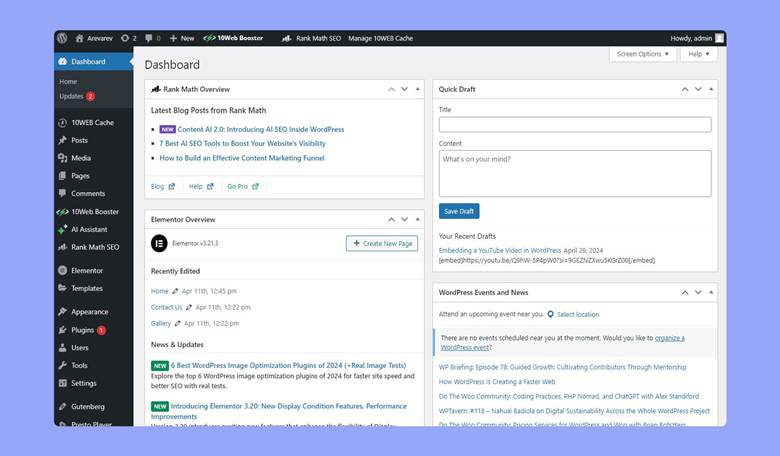
When you first log into WordPress, you will see the admin dashboard. This is the control center where you manage pages, products, themes, plugins, and settings.
On the left side of the dashboard, you will find the most important sections:
- Posts – used for blog articles
- Pages – used for website pages such as About or Contact
- Appearance – used to install and customize themes
- Plugins – used to add new features
- Settings – used to control website behavior
Since we want to build an online store, the next step is installing WooCommerce.
WooCommerce is a plugin that converts a WordPress website into a full ecommerce store.
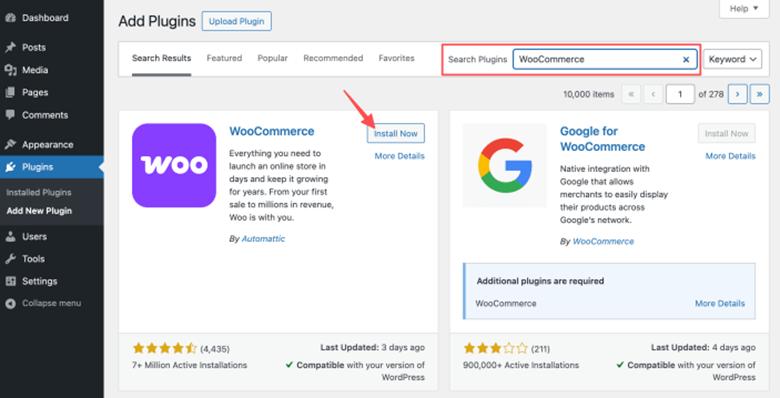
To install WooCommerce, open the WordPress dashboard and navigate to Plugins → Add New. In the search bar, type “WooCommerce”. Once the plugin appears, click Install Now and then click Activate.
After activation, WooCommerce launches a setup wizard. This wizard asks for basic information about your store, including your store location, the type of products you sell, and whether you want to install recommended features.
During the setup process, WooCommerce automatically creates essential ecommerce pages such as:
- Shop page
- Cart page
- Checkout page
- Customer account page
These pages are required for your ecommerce store to function properly.
The visual design of your jewelry website is controlled by a WordPress theme. A theme determines how your website looks, including typography, layout, and product display.
Jewelry websites typically use elegant and minimal designs that highlight product images. Because jewelry is a luxury product, the website design should feel clean and premium.
Some excellent WooCommerce jewelry themes include:
Jewelry Store WooCommerce Theme
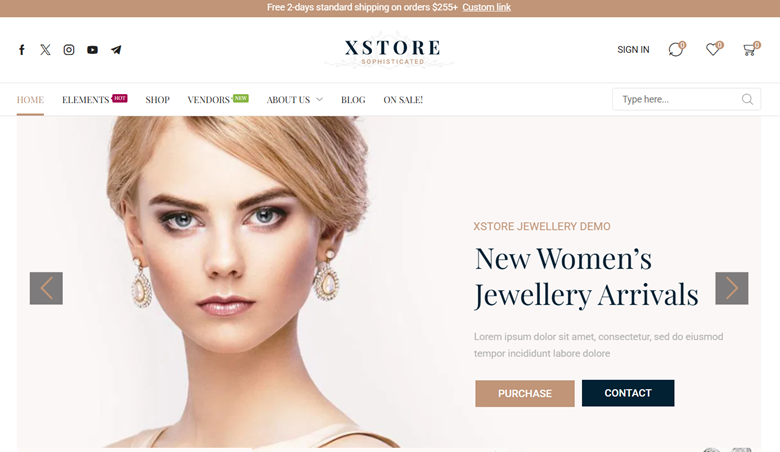
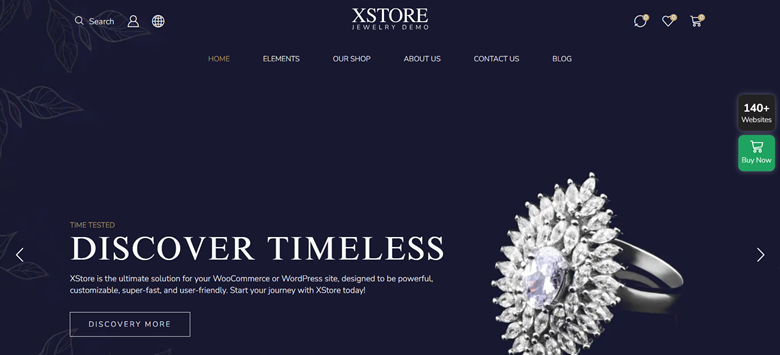
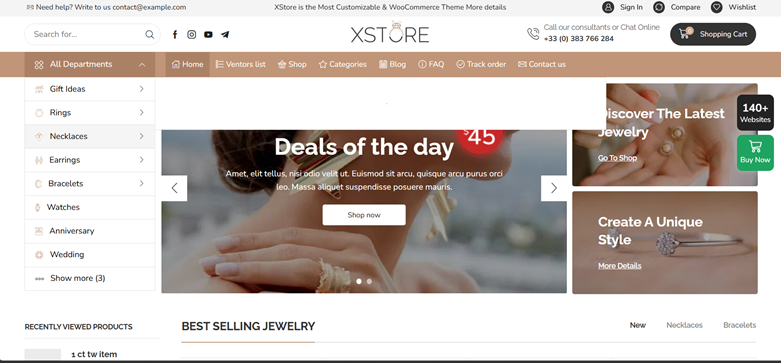
These templates are designed specifically for jewelry businesses and include layouts optimized for product photography and ecommerce conversion.
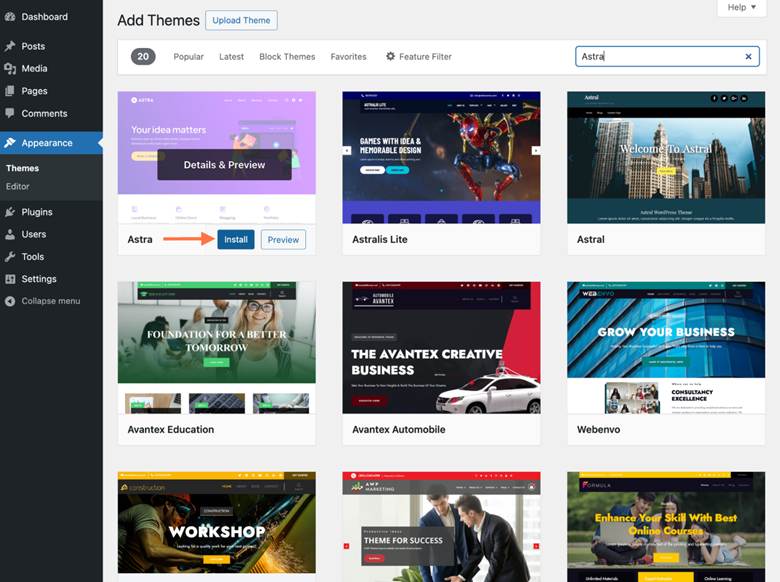
To install a theme, go to Appearance → Themes → Add New. You can either choose a free theme from the WordPress library or upload a premium theme file.
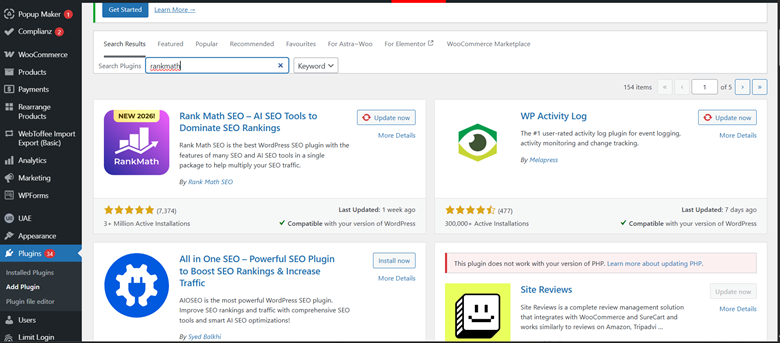
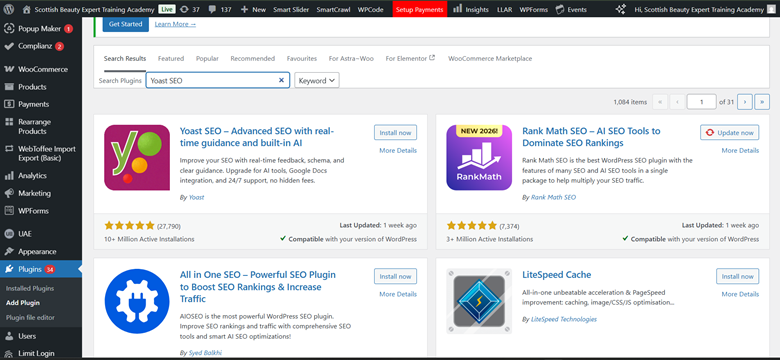
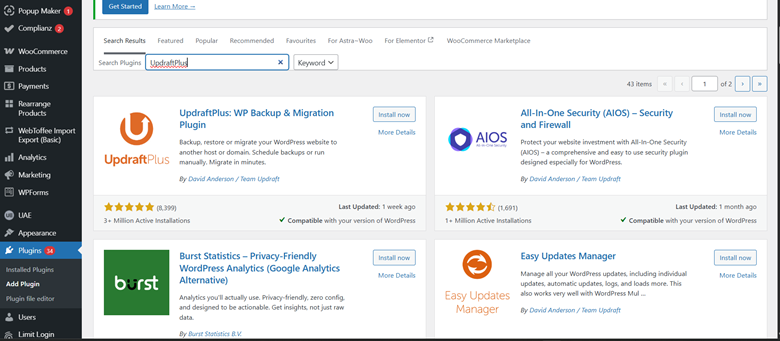
Plugins extend the functionality of your website. While WordPress and WooCommerce provide the basic ecommerce features, plugins help improve SEO, performance, security, and product management.
One of the first plugins you should install is an SEO plugin such as “Rank Math SEO or Yoast SEO” . These plugins help optimize your website so it can rank on Google search results.
Security is also very important for ecommerce websites. A plugin such as Wordfence Security protects your site from malware and hacking attempts.
Because jewelry websites use many high-resolution images, performance optimization is essential. Plugins like WP Rocket or LiteSpeed Cache improve loading speed by caching website files and optimizing scripts.
Another useful plugin is Smush or ShortPixel, which compresses images while maintaining quality.
For WooCommerce specifically, plugins like Variation Swatches for WooCommerce improve product variation selection, allowing customers to visually choose options such as metal color or gemstone type.
Finally, it is essential to install a backup plugin like UpdraftPlus. This plugin automatically creates backups of your website so you can restore it if anything goes wrong.
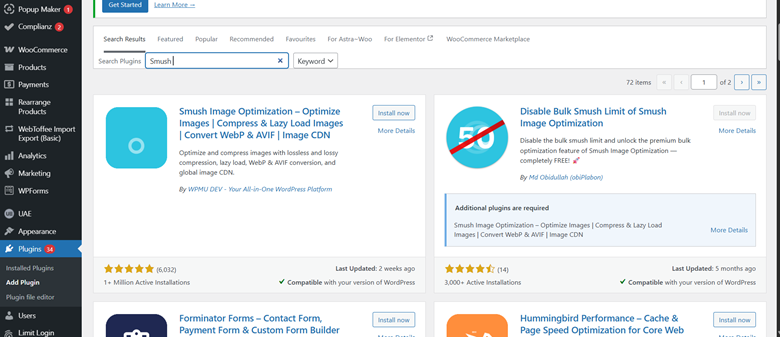
After installing WooCommerce and your theme, you can begin adding jewelry products to your store.
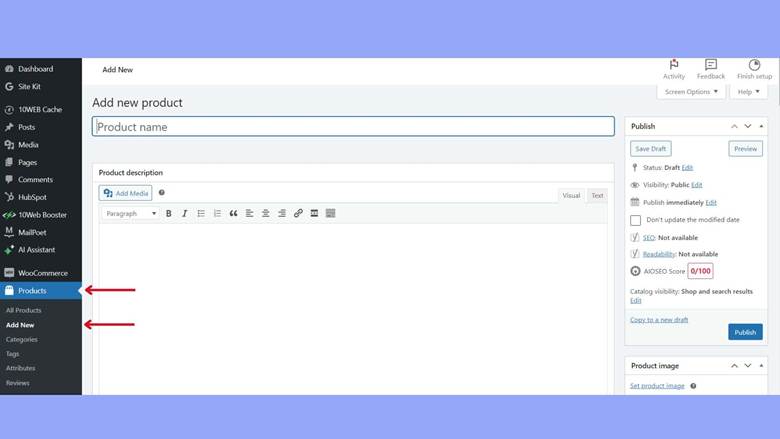
To add a product, navigate to Products → Add New inside the dashboard. You will first enter the product title and description. For example, a product title might be “18K Gold Diamond Engagement Ring”.
The product description should include detailed information about the jewelry piece, including metal purity, gemstone details, craftsmanship, and design inspiration.
Below the description section, you will find the product data box. This is where you set the product price, inventory information, shipping settings, and variations.
High-quality images are extremely important for jewelry ecommerce. You should upload a main product image as well as additional gallery images showing different angles of the jewelry piece.
Many jewelry products require variations. For example, rings come in multiple sizes and metals.
WooCommerce allows you to create product attributes such as:
- Ring size
- Gold color
- Gold purity
- Gemstone type
Inside the product settings, you can create these attributes and then generate variations automatically. Each variation can have its own price, stock quantity, and image.
For example, a ring might have variations for sizes 6, 7, 8, and 9, with slightly different pricing depending on weight.
This flexibility makes WooCommerce suitable for jewelry ecommerce.
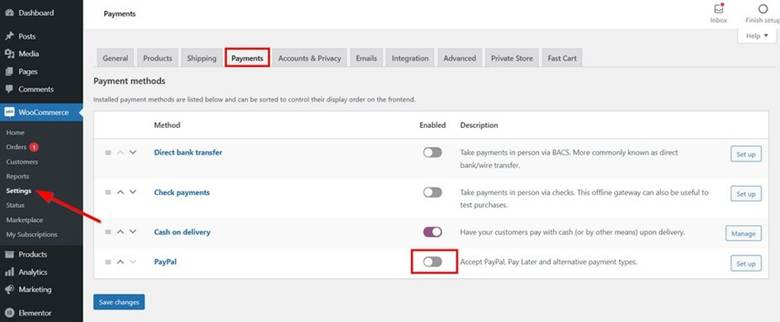
An ecommerce store must allow customers to pay online. WooCommerce supports several payment gateways.
Popular payment options include:
- PayPal
- Stripe (credit and debit cards)
- Direct bank transfer
- Cash on delivery
To configure payments, navigate to WooCommerce → Settings → Payments. Here you can enable and configure different payment methods.
Many stores install the WooCommerce Stripe Payment Gateway plugin, which allows customers to pay using credit cards.
Shipping settings determine how products are delivered to customers.
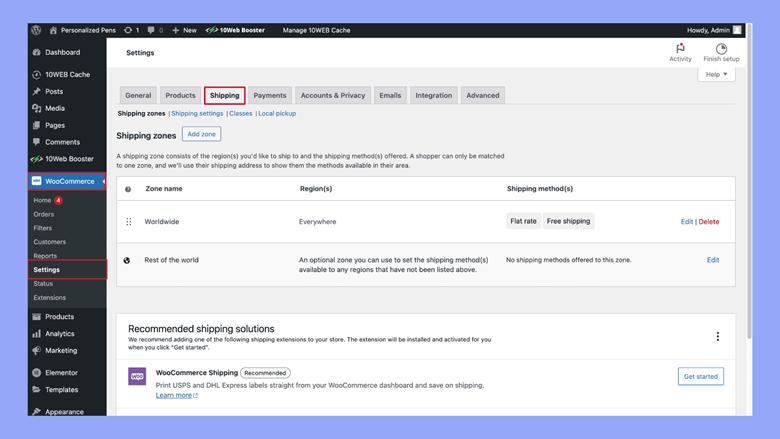
Inside WooCommerce, shipping can be configured using shipping zones. For example, you might create one zone for domestic shipping and another for international orders.
Each shipping zone can have different pricing rules. Some stores charge a flat shipping fee, while others offer free shipping above a certain order value.
Shipping settings can be configured by going to WooCommerce → Settings → Shipping.
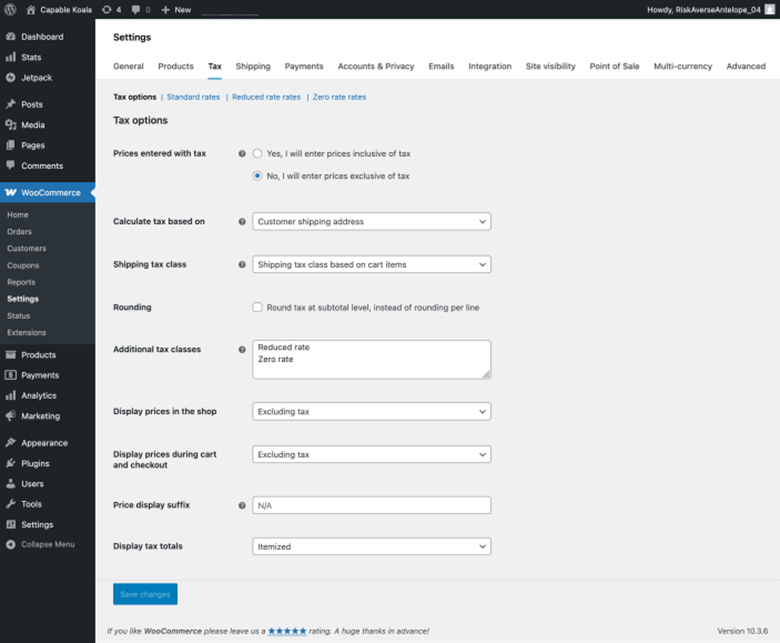
Taxes depend on the country where your business operates. WooCommerce allows you to configure tax rates based on location.
To enable taxes, go to WooCommerce → Settings → General and activate the tax option. After enabling taxes, you can configure different tax rates for various regions.
Below is a basic estimate of the cost required to create a jewelry website using WordPress and WooCommerce.
| Component | Estimated Cost | Billing Type | Description |
|---|---|---|---|
| Domain Name | Rs 2000 onwards | Per Year | The website address customers will use to access your jewelry store (e.g., yourbrand.com). |
| Web Hosting | Rs 2500 onwards | Per Year | Hosting stores your website files and makes the site accessible online. Higher plans offer better speed and security. |
| Premium Jewelry Theme | $40 – $80 | One-time | A professional WordPress theme designed for jewelry ecommerce with elegant layouts and product display features. |
| Essential Plugins | Free – $200 | One-time / Yearly | Plugins add additional functionality such as SEO optimization, security protection, product variations, and performance improvements. |
| Payment Gateway Fees | 2% – 3% per transaction | Per Transaction | Payment providers like Stripe or PayPal charge a small fee for processing online payments from customers. |
Creating a jewelry website using WordPress and WooCommerce is now more accessible than ever. With the right hosting, theme, plugins, and product setup, even beginners can build a professional ecommerce store.
The most important steps include choosing reliable hosting, installing WooCommerce, selecting a jewelry-focused theme, installing essential plugins, and carefully adding product variations.
Creating a jewelry website using WordPress and WooCommerce is now more accessible than ever. With the right hosting, theme, plugins, and product setup, even beginners can build a professional ecommerce store. Businesses seeking digital marketing services in Conroe or digital marketing services in Spring can benefit from a strong online presence. Similarly, companies investing in plumbing advertising in Aberdeen, real estate advertising in Aberdeen, or automotive advertising in Aberdeen understand the importance of a well-optimized website for generating leads and sales.
The most important steps include choosing reliable hosting, installing WooCommerce, selecting a jewelry-focused theme, installing essential plugins, and carefully adding product variations.
Once your website is launched, you can start promoting it through search engine optimization, social media marketing, and online advertising. Businesses looking for cost-effective solutions can also explore our guide on Affordable website development Edinburgh to understand how professional websites can be built without exceeding budget.
With proper planning and continuous improvement, your jewelry website can grow into a successful online business.
Ready to Transform Your Digital Presence?
Let Qaushik Labs help you implement growth-focused solutions for your business. From websites and SEO to ads and automation, we’re here to help you generate better leads and revenue.
Get Started TodayYes. WordPress and WooCommerce together provide everything needed to build a secure and scalable jewelry ecommerce website.
WooCommerce supports product variations, detailed specifications, high-resolution images, secure payment processing, and flexible inventory management.
Fast server speeds, automatic backups, security protection, free SSL certificate, and WordPress optimization are especially important.
Jewelry websites usually work best with elegant, premium-looking themes that highlight product photography and create a luxury feel.
Yes. Jewelry products often require variations for ring size, gold color, gold purity, and gemstone type.
WooCommerce supports PayPal, Stripe, direct bank transfer, cash on delivery, and many other payment gateway integrations.
Yes. WooCommerce allows you to configure shipping zones and assign different pricing rules for domestic and international orders.
Taxes can be enabled in WooCommerce settings and configured based on different regional tax rates depending on where the business operates.
The cost depends on components such as domain, hosting, premium theme, plugins, and payment gateway fees, starting from a few thousand rupees and increasing with added functionality.
Yes. With the right hosting, theme, plugins, and setup guidance, even beginners can build a professional jewelry ecommerce store.